GHT-Pro
In Stock
Product Video
Product Description
Expert Advisor version of the GHT
Included Files
Purchase Required
Log in and purchase this product to access included files.
Additional Information
Inputs:
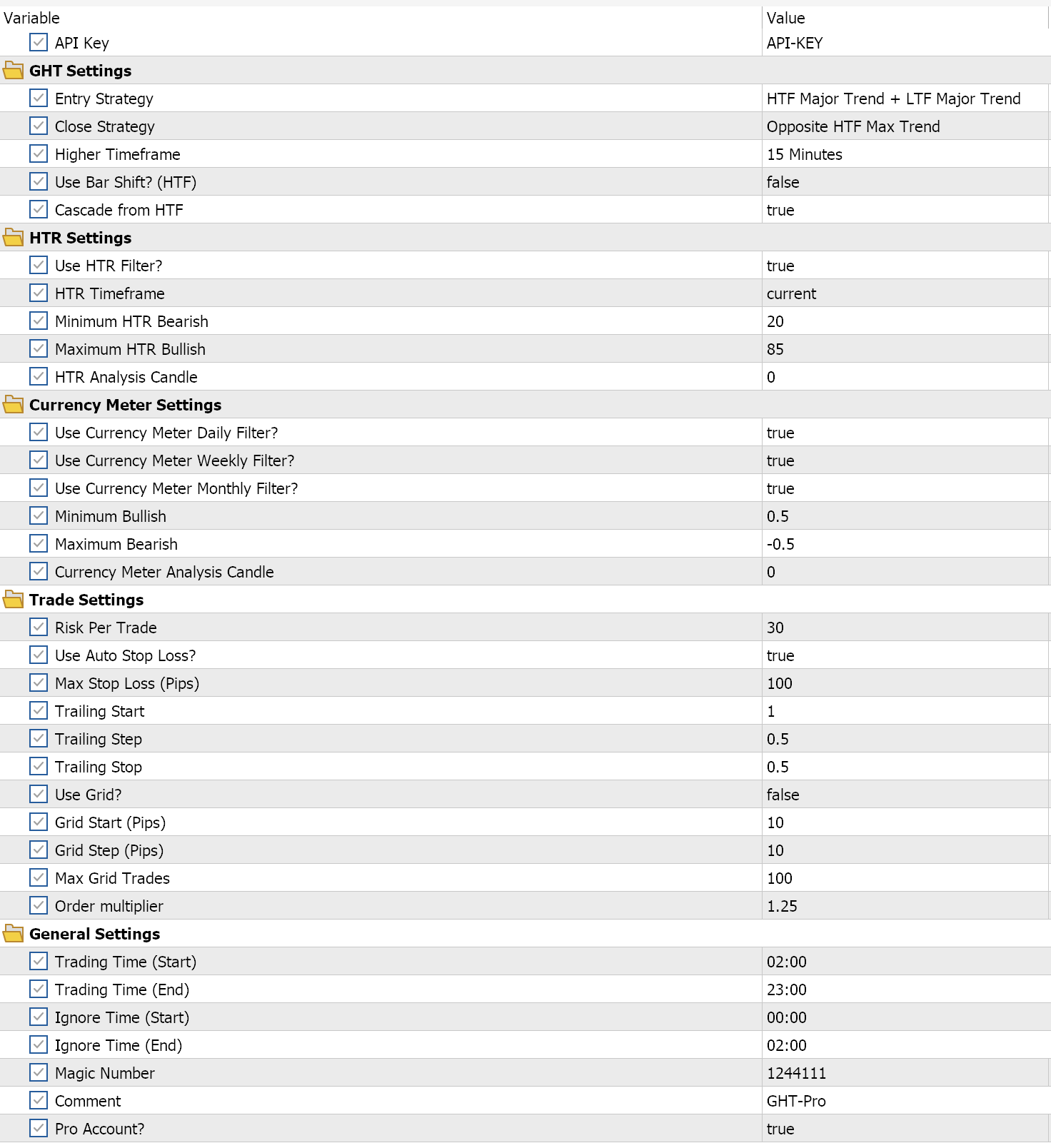
- API Key: Your full API key from your profile.
- Entry Strategy: Choice between 8 strategies
- Max Trend + Arrow on Bar 1
- Bullish/Bearish SuperTrend at 1.0 and Buy/Sell Arrow on the previous bar
- Max Trend + Arrow on Bar 1 or 2
- Bullish/Bearish SuperTrend at 1.0 and Buy/Sell Arrow on the previous bar (or bar before that)
- Major Trend + Arrow on Bar 1
- Most Recent SuperTrend and Buy/Sell Arrow on the previous bar
- Major Trend + Arrow on Bar 1 or 2
- Most Recent SuperTrend at 1.0 and Buy/Sell Arrow on the previous bar (or bar before that)
- HTF Trend + LTF Arrow on Bar 1
- Bullish/Bearish SuperTrend at 1.0 (on the higher timeframe) and Buy/Sell Arrow on the previous bar (of the current timeframe)
- HTF Arrow + LTF Arrow on Bar 1
- Buy/Sell Arrow on the previous bar (on the higher timeframe) and Buy/Sell Arrow on the previous bar (on the current timeframe)
- HTF Major Trend + LTF Arrow
- Most Recent SuperTrend (of the higher timeframe) and Buy/Sell Arrow on the previous bar (of the current timeframe)
- HTF Major Trend + LTF Major Trend
- Most Recent SuperTrend (of the higher timeframe) and Most Recent SuperTrend (of the current timeframe)
- Max Trend + Arrow on Bar 1
- Close Strategy: Choice between 4 strategies
- Opposite Arrow
- Buy Arrow appears (when selling) or Sell Arrow appears (when buying)
- HTF Opposite Arrow
- Higher Timeframe Buy Arrow appears (when selling) or Higher Timeframe Sell Arrow appears (when buying)
- Opposite Max Trend
- Bullish SuperTrend at 1.0 (when selling) or Bearish SuperTrend at 1.0 (when buying)
- Opposite HTF Max Trend
- Higher Timeframe Bullish SuperTrend at 1.0 (when selling) or Higher Timeframe Bearish SuperTrend at 1.0 (when buying)
- Opposite Arrow
- Higher Timeframe: Timeframe choice for the higher timeframe confluence
- Use Bar Shift? (HTF): Select true to match the higher timeframe's time with the current time.
- Cascade from HTF: Select true to require the GHT-Pro to check each timeframe (starting from the "Higher Timeframe" input choice) to see if they are all bullish or bearish
- Use HTR Filter?: Select true to utilize the HTR filter
- HTR Timeframe: Timeframe choice for the HTR
- Minimum HTR Bearish: Lowest HTR value for sell entries
- Maximum HTR Bearish: Highest HTR value for buy entries
- HTR Analysis Candle: Candle to get HTR values from (0 = current, 1 = previous bar, etc)
- Use Currency Meter Daily Filter?: Select true if you want to use the Currency Meter Daily Filter (only buy if the pair is bullish on the day, and vice versa)
- Use Currency Meter Weekly Filter?: Select true if you want to use the Currency Meter Weekly Filter (only buy if the pair is bullish on the week, and vice versa)
- Use Currency Meter Monthly Filter?: Select true if you want to use the Currency Meter Monthly Filter (only buy if the pair is bullish on the month, and vice versa)
- Minimum Bullish: Minimum amount of positive growth by the currency pair within the selected filters
- Maximum Bullish: Maximum amount of negative growth by the currency pair within the selected filters
- Currency Meter Analysis Candle: Candle (of the current timeframe) to get Currency Meter values from (0 = current, 1 = previous bar, etc)
- Risk Per Trade: Percentage amount of your account to risk per trade
- Max Lot Size: Maximum allowed lot size per trade
- Use Auto Stop Loss?: Select true to let the GHT-Pro to use the highest/lowest low/high values of the previous 5 candles
- Max Stop Loss (Pips): Maximum stop loss in pips. This acts as your stop loss if the "Use Auto Stop Loss?" is set to false.
- Trailing Start: Percent in profit for the trailing to begin (The EA sets a mental stop loss percentage once profit reaches this percent.)
- Trailing Step: The mental stop loss percentage increases incrementally with profit by this value.
- Trailing Stop: The initial mental stop loss percentage.
- Use Grid?: Select true to allow grid trading
- Grid Start (Pips): Pips from the initial order to start grid trading
- Grid Step (Pips): Pips between each grid trade
- Max Grid Trades: Maximum allowed grid trades
- Order multiplier: Order multiplier applied to each new grid trade
- Trade Time (Start): Server time for trading to be allowed
- Trading Time (End): Server time for trading to end
- Ignore Time (Start): Start time (in server time) during which trading is not allowed
- Ignore Time (End): End time (in server time) during which trading is not allowed
- Magic Number: A 6-digit identifier used by your broker to recognize your trades.
- Comment: Order Comment
- Pro Account?: Select true if you have a Prime account with Ox Securities or Lirunex.
10/15/2025 (v1.19)
- Added break-even hedge functionality
- Updated the
Grid TrendandGrid Trend Candlesoption to grid as intended
04/27/2025 (v1.18)
- Added a None option to the Close Strategy
10/05/2024 (v1.17)
- Added a take profit in pips input
09/22/2024 (v1.16)
- Added an option to reverse trades
- Updated to the latest currency meter library
09/06/2024 (v1.15)
- Added new grid options
- Grid: our usual grid (stacks in drawdown by X pips after the grid is activated)
- Grid Candle: if the initial trade is a buy, it will buy after each candle close; if the initial trade is a sell, it will sell after each candle close
- Grid Candle Trend: if the initial trade is a buy, it will buy after each bullish candle close; if the initial trade is a sell, it will sell after each bearish candle close
- Added an option to choose between HTR or HTRMA as the source indicator for the HTR
09/04/2024 (v1.14)
- Updated the Opposite Max Trend and Opposite HTF Max Trend closing options to work as intended
08/31/2024 (v1.13)
- Updated the HTR to the latest library
08/29/2024 (v1.12)
- Updated the All option in the Trailing Strategy input list to include the Trailing Candle
- Added 3 more Trailing Strategy choices (Auto + Candle, Auto + Percent, Candle + Percent)
08/29/2024 (v1.11)
- Updated the trailing candle function to only move the stop loss if the desired stop loss is above the buy entry price/below the sell entry price.
08/28/2024 (v1.10)
- updated the Max Lot Size input to work as intended
- updated the pair suffix function to automatically find the appropriate suffix based on the user's account company and the current chart symbol (second update)
- changed the default Trailing Strategy to All instead of Trailing Percents
08/23/2024 (v1.09)
- added a Max Lot Size input
- added Trailing Candle to the list in the Trailing Strategy input
- updated the pair suffix function to automatically find the appropriate suffix based on the user's account company and the current chart symbol
Price
$997.00